
Code and reproduction resources
- Complete code:
09-vision-grpo- Quick start:
start.md- Dataset:
hz2475/geoQA- GRPO paper: DeepSeekMath
- PyTRIO documentation: docs.pytrio.com
This is the ninth chapter in my series reproducing ten reinforcement learning algorithms.
The first eight chapters mainly used text prompts. This time I wanted to make the entire RL pipeline multimodal: the model sees a geometry diagram, reads the question and four options, generates a group of answers concurrently, and updates online using a verifiable answer reward.
I first completed this experiment in a separate directory and have now organized it as an independent chapter of agentic-rl-lab. Data download, training, single-model evaluation and plotting each have their own script, making the pipeline easy to follow.
Here are the final results. On a fixed set of 100 GeoQA test examples, Qwen3.5-4B achieved the following after 100 steps of Vision GRPO:
| Model | Accuracy | Format rate |
|---|---|---|
| Base | 71.0% | 75.0% |
| GRPO step 100 | 87.0% | 91.0% |
| Improvement | +16.0 pp | +16.0 pp |
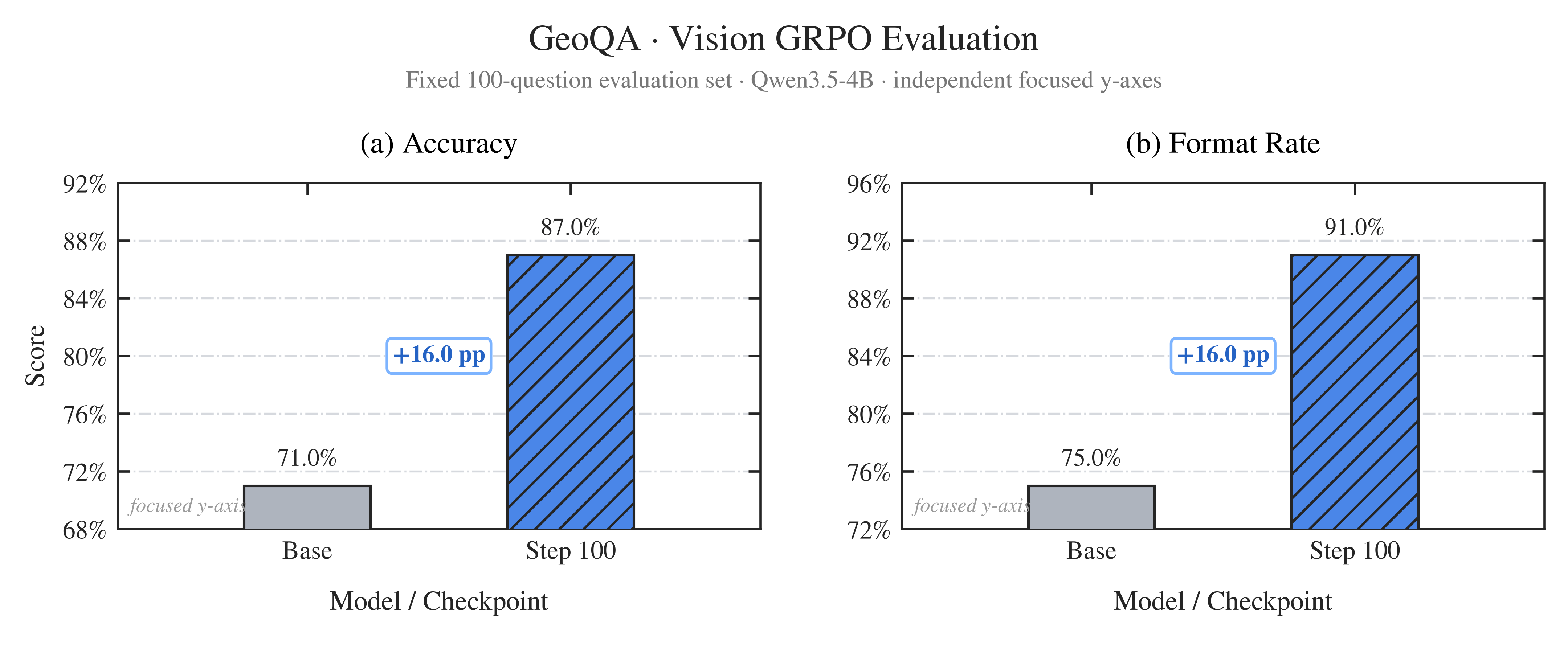
The scope is specific: the script selects a fixed subset of 100 examples from the original GeoQA test split. These numbers are not a benchmark result on all 759 test examples. The repository includes the evaluation method and summary plots, but does not commit per-example JSON files or remote checkpoints.
0. What exactly did we train?
GeoQA is a Chinese geometry question-answering dataset. Each example contains a diagram, a question, four candidate answers, the correct option label and fields such as the dataset's original explanation.
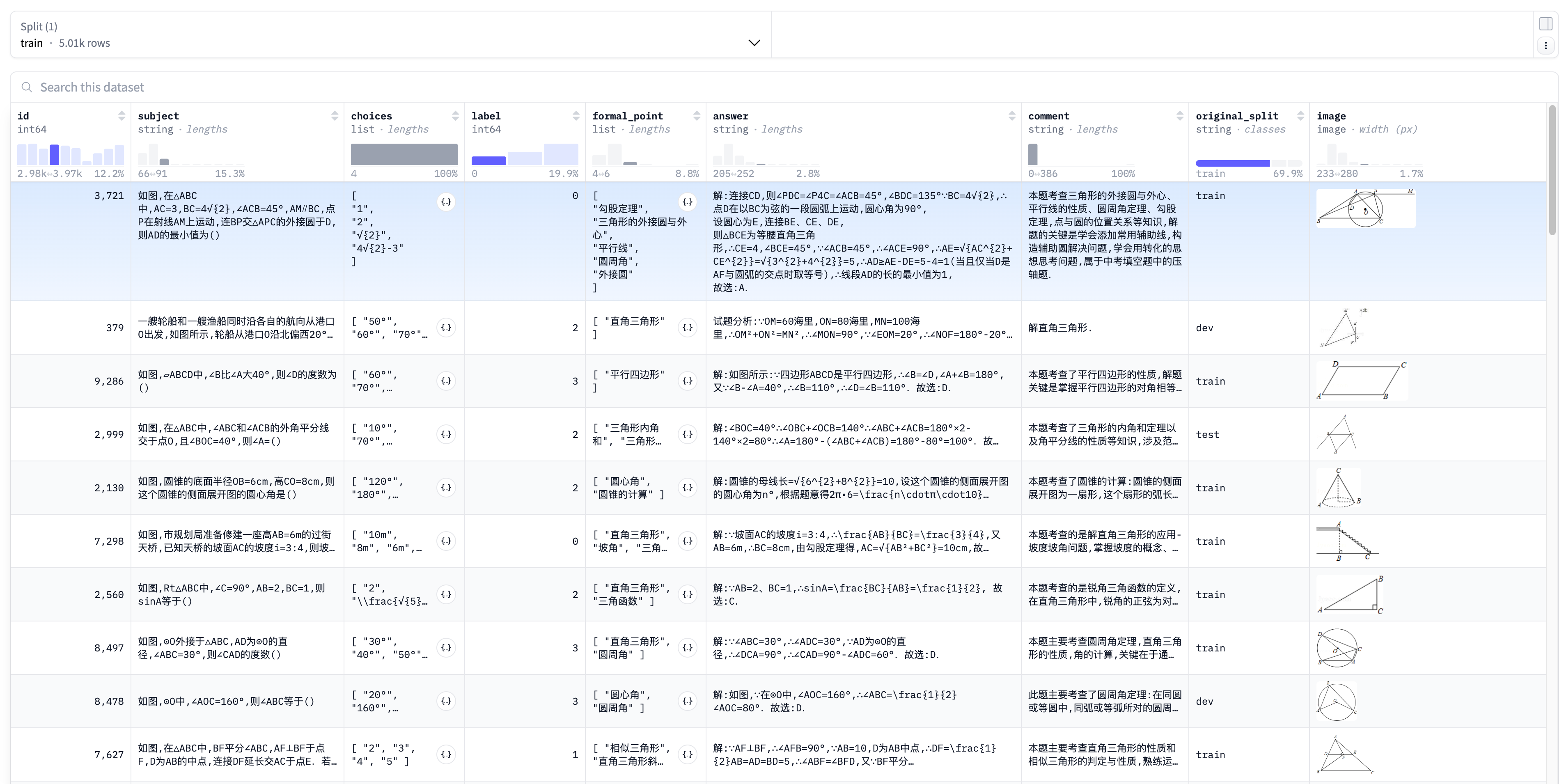
The source dataset contains 5,010 examples:
| Original split | Count | Use in this chapter |
|---|---|---|
| train | 3,503 | All used for training |
| test | 759 | A fixed subset of 100 used for evaluation |
| dev | 748 | Not used in this experiment |
download-dataset.py keeps the complete train split, shuffles the original test split with seed=42, and writes the last 100 examples to datasets/test.parquet. Training and evaluation read separate files:
09-vision-grpo/datasets/
├── train.parquet
└── test.parquet
The model receives only the image, question and options. The training reward derives the correct option from label; the original explanation in answer is not supplied to the model as supervision.
The main configuration is:
| Item | Configuration |
|---|---|
| Base model | Qwen/Qwen3.5-4B |
| Training method | LoRA, rank 32 |
| Optimization | Group-relative advantage + importance_sampling |
| Full run | 100 steps |
| Questions per step | 8 |
| Rollouts per question | 8 |
| Maximum generation length | 1,024 tokens |
| Learning rate | 4e-5 |
| Vision-language template | enable_thinking=False |
1. How does an image enter PyTRIO?
This is the biggest difference between Vision GRPO and text-only GRPO.
The training script first formats messages with the model's own chat template. Each message includes text and an image placeholder:
messages = [
    {
        "role": "user",
        "content": [
            {"type": "text", "text": format_question(subject, choices)},
            {"type": "image", "image": "geoqa"},
        ],
    }
]
Template rendering explicitly sets enable_thinking=False. This disables the template's built-in thinking mode. The prompt still asks for brief reasoning followed by a final option from \boxed{A} to \boxed{D}.
The rendered prompt is split at <|image_pad|> into three chunks:
EncodedTextChunk
        +
ImageChunk
        +
EncodedTextChunk
GeoQA images undergo two more steps before being sent to the service:
- Composite RGBA images onto a white background and convert them to RGB, avoiding black transparent regions.
- Use the model's image processor to calculate the number of visual patches and write it to
ImageChunk.expected_tokens.
The resulting ModelInput contains actual image bytes and a sequence length that can be computed locally. After sampling, the code checks:
response.input_tokens == len(prompt)Training fails immediately if the local visual-token estimate differs from the remote result. This matters because target_tokens, old log probabilities and advantages must all use the same positional coordinate system.
2. The Vision GRPO training loop
The complete data flow can be summarized as follows:
GeoQA 图文题目
    ↓
当前 LoRA 权重生成 sampler
    ↓
同题并发采样 8 条 completion
    ↓
解析最后一个 \boxed{A-D}
    ↓
规则 reward:正确为 1,其余为 0
    ↓
组内计算 relative advantage
    ↓
构造多模态 Datum 并更新 LoRA
2.1 Sample a group of answers to the same question
Let a group contain G completions. The reward for answer i is:
The parser uses the last \boxed{} option in the response. This tolerates tentative options inside the reasoning while requiring a clear final answer. A response without a parseable boxed option also receives 0.
2.2 Compare answers within each question
The advantage of each answer is:
Suppose 6 of the 8 answers to a question are correct and 2 are incorrect:
- A correct answer has advantage
1 - 0.75 = 0.25. - An incorrect answer has advantage
0 - 0.75 = -0.75.
The model increases the relative probability of correct trajectories and decreases that of incorrect ones.
If every answer in a group is correct or every answer is incorrect, all advantages are 0. The code marks the question as a degenerate group and skips it, avoiding a backward pass on completions with no relative training signal.
2.3 The image and text prompt provide context
The fields required by importance_sampling must align exactly with model_input:
| Field | Prompt / image positions | Completion positions |
|---|---|---|
model_input | Complete image and text chunks | completion[:-1] |
target_tokens | 0 placeholders | Complete completion tokens |
logprobs | 0.0 placeholders | Old log probabilities returned during rollout |
advantages | 0.0 placeholders | The completion's group-relative advantage |
Prompt text and images provide context; policy gradients apply only to generated completion tokens. Old log probabilities must come from the sampler used for the current step's rollout. Recomputing log probabilities after a model update cannot replace them.
The core code is short:
model_input = trio.ModelInput(
    chunks=[
        *group.prompt_chunks,
        trio.types.EncodedTextChunk(tokens=sample.tokens[:-1]),
    ]
)

datum = trio.Datum(
    model_input=model_input,
    loss_fn_inputs={
        "target_tokens": np.asarray(
            [0] * observation_length + sample.tokens,
            dtype=np.int64,
        ),
        "logprobs": np.asarray(
            [0.0] * observation_length + sample.logprobs,
            dtype=np.float32,
        ),
        "advantages": np.asarray(
            [0.0] * observation_length
            + [sample.advantage] * len(sample.tokens),
            dtype=np.float32,
        ),
    },
)
3. How do I start training?
Run all commands from the repository root. The project requires Python 3.13 or later and pins pytrio==0.2.7.
3.1 Install and log in
uv sync
trio login
swanlab login
3.2 Download GeoQA
uv run python 09-vision-grpo/download-dataset.pyThe default output contains 3,503 training examples and the fixed 100 test examples. For strict reproduction, pass the same Hugging Face dataset revision through --revision to avoid drift when main changes.
3.3 Start with 1 step
This command calls paid remote sampling and training services. Start with a small batch to check images, token alignment, rewards and the asynchronous API:
uv run python 09-vision-grpo/train.py \
  --steps 1 \
  --batch-size 1 \
  --group-size 4 \
  --max-tokens 256 \
  --save-every 0 \
  --no-save-weights \
  --show-samples \
  --swanlab-mode disabled
All 4 answers to a single question may receive the same reward. In that case, the script completes the rollout normally but performs no backward pass for the step. Increase batch-size or group-size when you need to check the complete update pipeline.
3.4 Reproduce the 100-step configuration
uv run python 09-vision-grpo/train.py \
  --base-model Qwen/Qwen3.5-4B \
  --lora-rank 32 \
  --steps 100 \
  --batch-size 8 \
  --group-size 8 \
  --max-tokens 1024 \
  --temperature 1.0 \
  --top-p 1.0 \
  --learning-rate 4e-5 \
  --save-every 25 \
  --swanlab-mode online
Each save prints two kinds of paths:
Sampler 权重:trio://.../sampler_weights/...-sampler
State 权重:trio://.../training_state/...-state
Use sampler_weights for inference and evaluation, and training_state to resume training.
See the quick start for a compact command list.
4. Which training metrics should I watch?
The following SwanLab curves come from a small 20-step trial.
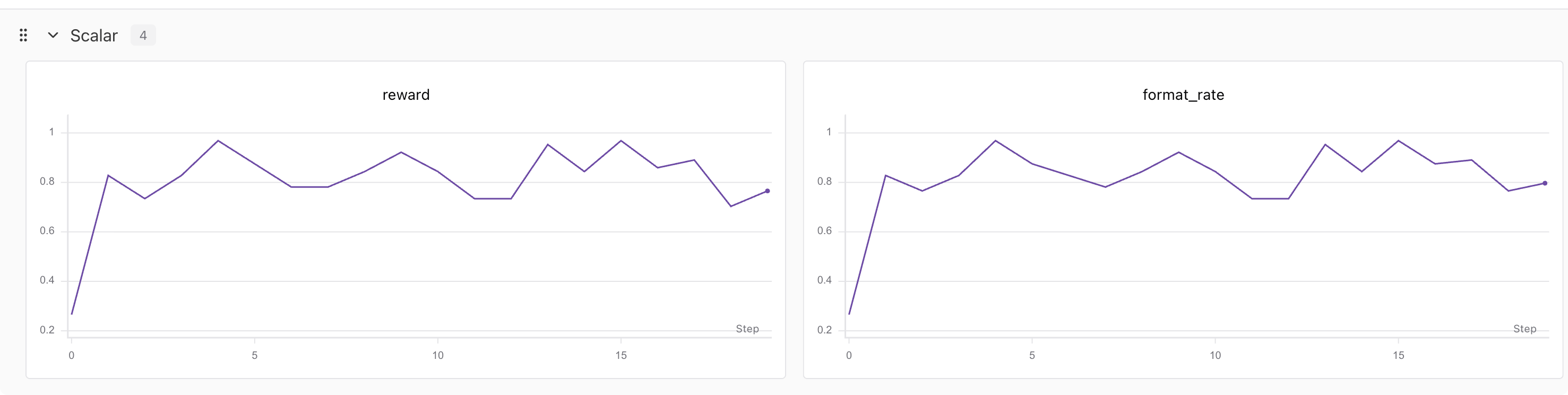
The script records these metrics by default:
| Metric | Meaning |
|---|---|
reward | Mean rule-based reward across questions in the current batch |
format_rate | Fraction of completions with a parseable \boxed{A-D} option |
degenerate_fraction | Fraction of questions with identical rewards across the group and no relative signal |
train_datums | Number of completions actually used for training |
rollout/completion_tokens_mean | Mean generation length in the current batch |
trainer/* | Training metrics returned by the PyTRIO service |
The same 20-step session recorded 33.79K prefill tokens, 0.40M train tokens and 0.62M sample tokens. The page displayed a cost of ¥5.06 at the time.

This screenshot describes that session only. Multiplying ¥5.06 cannot establish the cost of the full 100-step experiment: output length, the degenerate-group fraction, batch settings and service pricing all affect usage.
Online batch reward also varies with question difficulty. Final conclusions must come from the fixed test set.
5. How do I evaluate the base model and checkpoint?
eval.py creates one sampler per run. Without --model-path, it evaluates the base model; with a sampler weights path, it evaluates that checkpoint.
Evaluate the base model:
uv run python 09-vision-grpo/eval.py \
  --output 09-vision-grpo/eval-results-base.json
Evaluate the trained checkpoint:
uv run python 09-vision-grpo/eval.py \
  --model-path 'trio://RUN_ID/sampler_weights/WEIGHTS_NAME' \
  --output 09-vision-grpo/eval-results-step-100.json
Both evaluations use the same datasets/test.parquet, with these defaults:
| Item | Configuration |
|---|---|
| Number of test examples | 100 |
| seed | 42 |
| temperature | 0.0 |
| max tokens | 1,024 |
| Concurrency | Concurrent sample_async() calls on one sampler |
The evaluation results are:
| Model | Accuracy | Format rate | Sampling speed | Total time |
|---|---|---|---|---|
| Base | 71.0% | 75.0% | 2.20 sample/s | 48.65s |
| GRPO step 100 | 87.0% | 91.0% | 2.35 sample/s | 49.45s |
Sampling speed and time depend on the service conditions at the time and document this run only. The changes in accuracy and format rate are more informative.
The most interesting part of the results
Of the base model's 75 correctly formatted responses, 71 were correct: conditional accuracy 71 / 75 = 94.7%. At step 100, 87 of 91 correctly formatted responses were correct: conditional accuracy 87 / 91 = 95.6%.
The 16-percentage-point gain in overall accuracy mainly came from reliably completing the final boxed answer. Among responses that already produced a boxed option, accuracy increased by only 0.9 percentage points.
After training, 9 responses still could not be parsed. All 9 reached the 1,024-token limit and were truncated during reasoning. The other 91, correctly formatted responses averaged 278.8 output tokens. Continued training should track reward, format rate and completion length together, rather than letting increasingly long reasoning substitute for completing the task.
Regenerate the comparison figure:
uv run python 09-vision-grpo/analysis.pyanalysis.py plots the Base and step-100 summary values recorded in this article; it does not read newly generated evaluation JSON. After a new experiment, update BASE_RESULTS and GRPO_RESULTS in the script first.
6. Implementation boundaries
enable_thinking=Falsedisables the chat template's built-in thinking mode; the prompt still requests brief logical reasoning.- The reward checks only whether the final option matches
label, without judging intermediate reasoning. - Responses without a parseable boxed option score 0, so the results reflect both answer accuracy and format compliance.
- Image
expected_tokensmust match the remote visual-token count. - Targets, old log probabilities and advantages at prompt and image positions are all 0.
- When rewards are identical throughout a group, there is no relative advantage signal and the code skips the update.
- A single
awaitonsample_async()returns the sampling result. The remote futures returned byforward_backward_async()andoptim_step_async()require anotherawait. - This chapter reports a single base-versus-checkpoint comparison on a fixed subset of 100 questions. It does not yet cover the complete test split, multiple seeds or other vision models.
- Dataset files, local SwanLab logs, evaluation JSON and Python caches are runtime artifacts and are not committed to Git.
7. File structure
09-vision-grpo/
├── download-dataset.py   # 下载 GeoQA,生成 train/test parquet
├── train.py              # 多模态 group rollout 与 GRPO 更新
├── eval.py               # 异步评测一个 Base 或 checkpoint
├── analysis.py           # 生成本文的固定结果对比图
├── start.md              # 从零开始的命令清单
├── readme.md             # 原理、实验结果与边界
└── images/               # 数据、训练、消费与评测图片
For a quick first run, start with start.md. To change the dataset or vision model, first read encode_image(), build_prompt_chunks() and build_grpo_datum() in train.py.